Guided capture
Field users can’t skip what the insurer requires.
- Guided mobile workflow
- RC and prior policy capture
- Chassis and odometer evidence
- Digital signature and operator identity
- Mandatory location
- 360° live video
- All-side images
AI Vehicle Pre-Inspection
ClaimHorizon Pre-Inspection uses guided capture, computer vision and document verification to give insurers a consistent, auditable record of vehicle condition before the policy is issued.
Documents
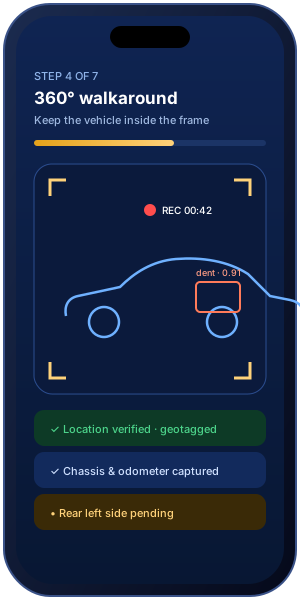
AI vehicle pre-inspection is a guided digital check of a vehicle’s condition before a motor policy is issued or renewed. The owner or agent captures documents, a continuous 360° video and all-side photos on a secure mobile link. Computer vision organises visible damage, and a trained reviewer approves an insurer-ready report.
Why it matters
If the condition at policy start isn’t recorded clearly, every later claim turns into an argument about what was already there.
Typical manual inspection
ClaimHorizon Pre-Inspection
Features
Field users can’t skip what the insurer requires.
Computer vision organises what the camera saw.
Signals for reviewers, reports for systems.
See the AI review
Tap a marker. Each annotation carries a type, a severity and the exact frame it came from, so the QC reviewer can confirm or edit it in seconds.
Illustrative example. Real results depend on capture quality and are always QC-reviewed.

How it works
Capture runs in the customer’s phone browser. The insurer decides what is mandatory.
The insurer, broker or agent opens an inspection with policy and vehicle details.
The owner or agent receives a time-bound link by SMS or email.
RC, prior policy, chassis, odometer, signature and location, each one checked before moving on.
One unbroken video around the vehicle, plus the required all-side photos.
Computer vision annotates damage, severity, glass, headlights and anomaly signals.
A trained reviewer approves, edits or requests resubmission. Every action is logged.
A QC-approved PDF and JSON report goes to the insurer and authorised stakeholders.
The output
Underwriters read the PDF. Your policy admin system reads the JSON. Both come from the same QC-approved record.

| Part | Observation | Severity |
|---|---|---|
| Front door (L) | Dent | Moderate |
| Front bumper | Scratch | Minor |
| Windscreen | No damage seen | None |
| Headlamps | No damage seen | None |
Reviewed by: QC Reviewer · Digitally signed · Sample data
{
  "inspection_id": "PI-24-77310",
  "status": "qc_approved",
  "vehicle": { "odometer_km": 42318, "fuel": "petrol" },
  "evidence": { "video_360": true, "images": 8, "geo_verified": true },
  "observations": [
    { "part": "front_door_left", "type": "dent", "severity": "moderate" },
    { "part": "front_bumper", "type": "scratch", "severity": "minor" }
  ],
  "alerts": { "chassis_tamper": false, "sticker_hiding": false },
  "qc": { "reviewer_id": "QC-104", "approved_at": "2026-10-16T10:42:00+05:30" }
}
When insurers use it
Inspect a vehicle quickly when a policy has lapsed and cover must restart.
Record condition before adding OD cover or add-ons such as zero depreciation.
Capture condition and documents when ownership and policy change hands.
Configurable checklists for trucks, buses and fleet vehicles.
Every pre-inspection passes technical QC before a report is issued. Reviewers can edit annotations, ask for a resubmission or escalate. Alerts such as chassis tampering are signals for review, not findings of fraud.
FAQs
AI pre-inspection is a guided digital inspection of a vehicle before a motor policy is issued or renewed. The vehicle owner, agent or inspector opens a secure link, captures the RC, prior policy, chassis and odometer, records a continuous 360° video and all-side photos, and computer vision organises visible damage for a trained QC reviewer to approve.
Insurers commonly ask for a pre-inspection when a policy has lapsed (break-in), when own-damage cover or add-ons such as zero depreciation are added, when a used vehicle changes ownership, or for commercial vehicles. Each insurer sets its own rules, and ClaimHorizon checklists can be configured to match them.
A typical ClaimHorizon pre-inspection captures the Registration Certificate (RC), prior policy details, chassis number, odometer reading, a digital signature with operator identity, and a mandatory location. Insurers can add or remove items in the checklist.
Computer vision reviews the 360° video and all-side images, annotates dents, scratches and other visible damage with severity indicators, and flags old-damage, glass and headlight observations. These are review aids: a trained QC reviewer confirms or edits every observation before the report is issued.
ClaimHorizon raises alerts for possible chassis tampering and sticker-hiding so a reviewer can look closer. An alert is a signal for review, not a finding of fraud.
No. The customer or agent opens a secure, time-bound inspection link on a smartphone browser and follows guided steps.
After technical QC, the insurer receives a QC-approved inspection report as a PDF for people and JSON for systems, linked to the original photos, video, location and timestamps.